.png "Getting Started With iBrin-3000E: Step-by-Step Guide for Touch-Screen Brinell Hardness Tester 1")
Hello, everyone. Today, I’m here to introduce to you the operation method of the outstanding product developed by Mikrosize — the iBrin-3000E Electronic Touch Screen Brinell Hardness Tester. This advanced hardness tester is designed to deliver precise and efficient measurement results, and it serves as an essential tool across numerous industries.
First of all, let’s take a look at this device. The iBrin-3000E features a clean-cut, ergonomic and user-friendly design. It is equipped with a large electronic touch screen for convenient operation and simple navigation. The screen delivers sharp display and highly responsive touch input, allowing you to input all required parameters accurately.
To start the testing process, power on the device. After booting up, the main menu will appear on the touch screen, where you can select the appropriate testing mode. The iBrin-3000E supports multiple modes to satisfy diverse testing requirements, including standard Brinell hardness testing and customised testing for specific materials.
.png "Getting Started With iBrin-3000E: Step-by-Step Guide for Touch-Screen Brinell Hardness Tester 2")
Next, prepare your sample. Ensure the sample surface is clean, smooth and free of defects or contaminants. Place the sample firmly onto the testing platform and achieve correct alignment. This hardness tester comes with a stable, adjustable testing platform to accommodate samples of various sizes and shapes.
Once the sample is properly positioned, proceed to set the testing parameters on the touch screen. You can configure key items such as test load and dwell time. Mikrosize has engineered an intuitive operating interface, so even users new to hardness testing can quickly become proficient. These parameters are critical, as they determine the accuracy and reliability of test results.
.png "Getting Started With iBrin-3000E: Step-by-Step Guide for Touch-Screen Brinell Hardness Tester 3")
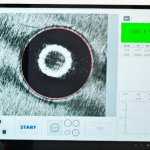
After completing all parameter settings, simply press the “Start” button on the touch screen. The hardness tester will automatically apply the specified load onto the sample, forming an indentation. Built-in high-precision sensing technology accurately measures the indentation diameter and calculates the Brinell hardness value of the sample accordingly.
-2.jpg "Getting Started With iBrin-3000E: Step-by-Step Guide for Touch-Screen Brinell Hardness Tester 4")
When the test finishes, results will be presented on the touch screen in a clear, readable format. You can view the Brinell hardness value together with other relevant data such as indentation diameter and applied test load. The iBrin-3000E also enables you to save and export test results for further analysis or test-result record-keeping. You may connect the instrument to a computer via a USB cable to transfer data to spreadsheets or other software for further evaluation.
If you run into issues during operation, the iBrin-3000E integrates a comprehensive help function within its touch-screen system. Navigate to the help section to access detailed operation instructions and troubleshooting tips for resolving common problems. Mikrosize also provides high-quality customer support. If your issue persists, feel free to reach out directly to their technical team.
In conclusion, the iBrin-3000E Electronic Touch Screen Brinell Hardness Tester from Mikrosize is an extremely reliable, easy-to-operate instrument. Its powerful features paired with intuitive touch-screen controls simplify hardness testing workflows. Whether you work in manufacturing, scientific research or quality control, this hardness tester will reliably meet your needs and deliver accurate, stable measurement results.
-150x150.jpg)