
In manufacturing, quality control, product development, and skills training, accurately measuring thrust, tensile force, and pressure is essential. The iForce-DF Digital Force Gauge from Mikrosize is a compact, handheld instrument designed for intuitive operation and reliable force readings. With its capacitive touch buttons, high-clarity LCD screen, and multiple measurement modes, it supports both handheld use and fixed-position mounting.
Design and Interface
The iForce-DF features a LCD screen display with high clarity for intuitive test results. All buttons on the front panel are capacitive touch screen controls, which simplifies cleaning and prevents mechanical wear. A measuring shaft at the top connects to various measurement adapters, including hook, extension shaft, flat tip, conical tip, chisel tip, and notched tip—all included in the standard package.
The instrument automatically recognizes and displays orientation, so users can see whether they are measuring tensile or compressive force. It supports multiple languages and multiple measurement units (N, gf, kgf, ozf, lbf), making it adaptable to different regional and industry preferences.
Connection and Mounting
On the rear panel, a USB interface is provided for charging or transferring data to a computer, while a multifunctional interface connects to the RS232 output of a mini printer or computer. For fixed-position testing, the back of the gauge has six M4 screw holes (installation depth 8 mm) for securing it to a stand, which improves the accuracy of test results. The screws should not exceed 7 mm into the gauge.
Display Information


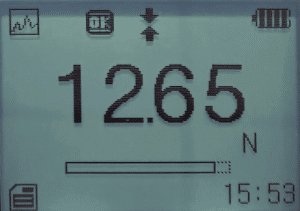
The display provides clear status information. A battery level display indicates current power or charging status and flashes when charging is needed. A tolerance alarm indicator shows “OK” within the limit range, and different symbols indicate below-lower-limit or above-upper-limit conditions. A direction icon represents tensile or compressive force. The measurement mode icon shows the active mode among Track, Peak, Auto Peak, and First Peak. A measurement analog bar displays the current value’s position within the full range; when it exceeds the enclosed area, the value is out of limit. The system time and selected units are also displayed.
Measurement Modes and Buttons
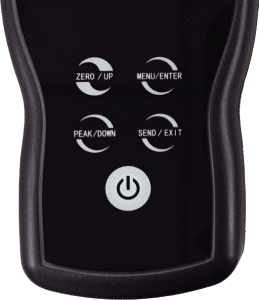
The gauge offers multiple measurement modes for different testing needs. In measurement mode, the Peak/Down button switches between measurement modes. The Zero/Up button zeros the reading in tracking mode or resets the peak value in peak mode. The Menu/Confirm button enters the menu and confirms selections. The Save/Back button prints or stores data, toggling between functions as set in the menu; by default it stores data. Holding the power button for about two seconds turns the device on or off.
Tolerance Limits and Alarm


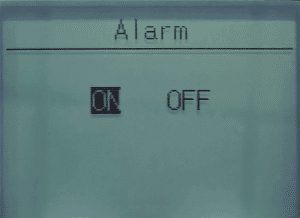
Users can set tolerance ranges for screening tests to achieve GO/NG classifications. The upper limit must be greater than the lower limit; the upper limit cannot exceed 110% of full scale, and the lower limit should not be less than 10% of full scale. After setting, the over-limit buzzer alarm function must be enabled for normal use.
Data Storage and Printing
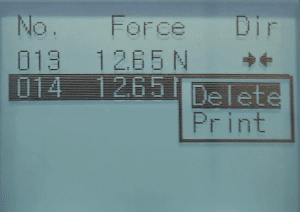
Measurement results can be stored on the force gauge for review or printing. Storage modes include single storage and continuous storage. Single storage applies to all measurement modes, while continuous storage is effective only in automatic peak mode. The instrument can store 1000 test data entries, and users can delete or print records directly from the data list.
Additional Settings
The gauge includes an automatic shutdown function with a default inactive interval of 5 minutes, adjustable as needed. Users can also select their preferred language. Two display modes are available: Numeric Mode and Graph Mode, allowing users to choose the presentation that best suits their workflow. A calibration function is provided; after a period of use, users can send the gauge to a professional testing department or perform calibration themselves.
Technical Overview
The iForce-DF series includes models from DF-1K to DF-100K, covering force ranges from 1 kgf to 100 kgf. Accuracy is ±0.2% F.S, with overload capacity of 120% F.S. The sampling frequency reaches 16 KHz (ADC), 8 KHz in peak mode, and 2 KHz in tracking mode. Powered by a rechargeable Ni-MH battery, the gauge operates from -10 to 40 °C and 20–80% RH, with dimensions of 160×73×34 mm and a net weight of 0.7 kg.
Conclusion
The iForce-DF Digital Force Gauge from Mikrosize combines a clear LCD, touch controls, multiple measurement modes, tolerance alarms, and data storage in a portable design. It supports manufacturing testing, quality control, skills training, and product development with reliable, repeatable force measurement.